Mastering the RIOS-CLI A Foundational Guide to Sovereign Administration
1. The Sovereign Paradigm: Local-First vs. Traditional Cloud
In an era of increasing volatility, the DeReticular Academy champions the “Sovereign Stack”—a paradigm shift from centralized dependency to local-first resilience. We no longer rely on the fragile, distant data centers of corporate giants like AWS or Google. Instead, we deploy civilization-critical services on field-deployable assets that prioritize privacy, offline functionality, and absolute control.
The Shift in Power
| Traditional Cloud (Old World) | Sovereign Stack (New World) |
| Fragile Dependency: Relies on global grid uptime and distant, harvested data centers. | Local Autonomy: Functions on IP67-rated, field-deployable assets like the CC-1000. |
| Vulnerable Perimeter: Susceptible to grid failure, heat, and third-party data exploitation. | Ruggedized Resilience: Features an “Exo-Shell” Faraday cage and local encryption. |
| Connectivity Dependent: Requires 100% internet uptime for even basic functionality. | Offline-First: Designed for “Kinetic Environments” with zero-interruption local mesh. |
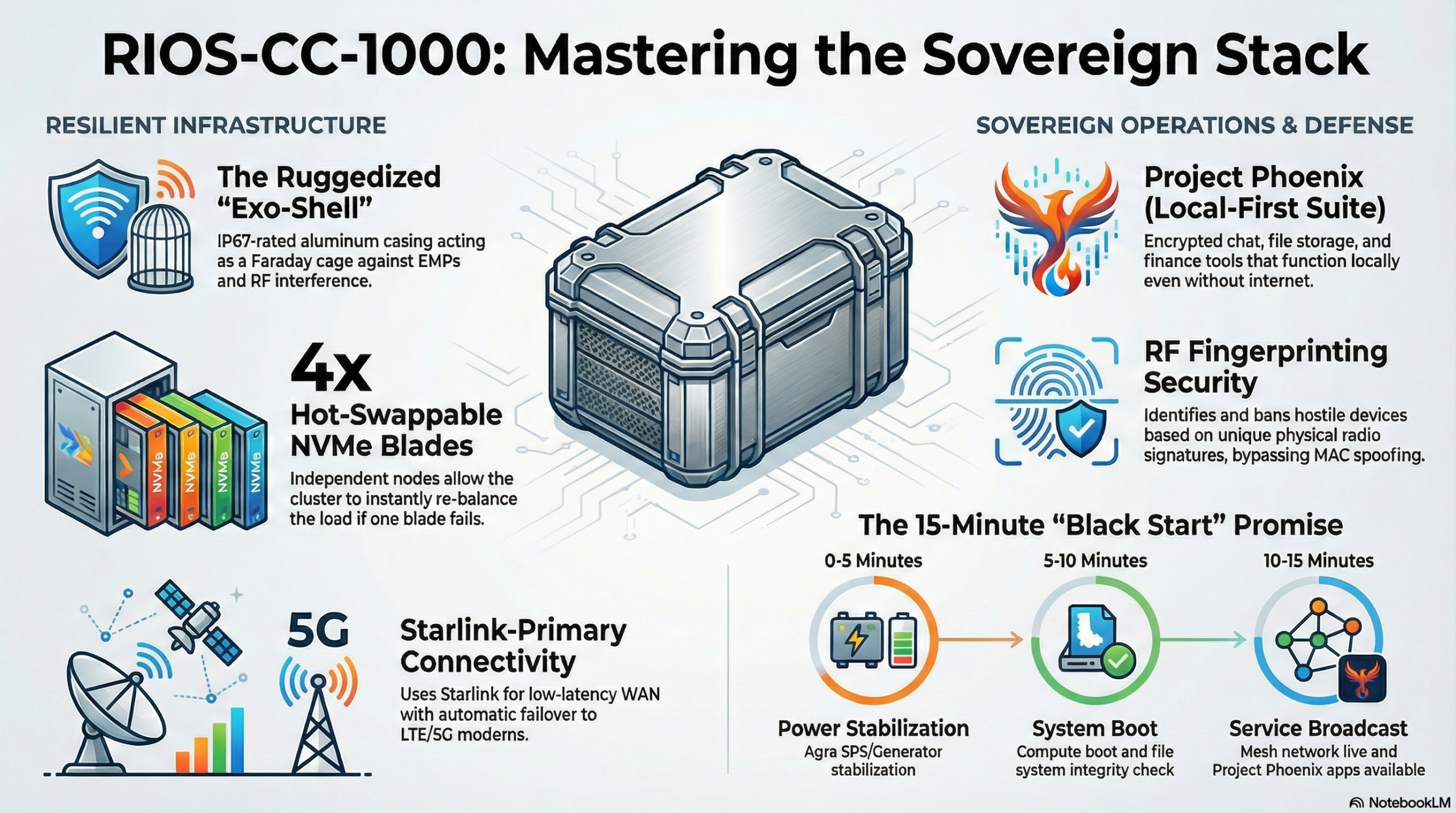
The bedrock of our administration is the 15-Minute Promise. This Service Level Agreement (SLA) is not a suggestion; it is our benchmark for survival. It guarantees a full restoration of services within three 5-minute windows:
- 0-5 Minutes: Power Stabilization via the Agra SPS (Smart Power System).
- 5-10 Minutes: Compute Boot and File System Integrity Checks.
- 10-15 Minutes: Mesh Network Broadcast and Application Availability.
Mastering this philosophy is the prerequisite for commanding the physical hardware that anchors our digital sovereignty.
——————————————————————————–
2. Physical Domain & System Status Monitoring
The RIOS-CC-1000 Compute Cluster is a survival tool built for kinetic environments. Its “Exo-Shell” aluminum Faraday cage protects against dust, vibration, and light EMPs. As an administrator, your primary duty is the maintenance of this physical domain, including a mandatory 30-day intake filter check to ensure the Positive Pressure Cycle cooling system remains unobstructed.
The unit utilizes a 4-node Compute Blade architecture. Monitoring these nodes requires vigilance:
- Seal Integrity Light: Located on the front chassis. WARNING: Never open the chassis if this light is Green. You must engage “Maintenance Mode” via the dashboard first; breaking the seal otherwise triggers intrusion detection and permanently locks the encryption keys.
- Blue LED (Storage): When replacing a drive, wait for this light to turn Solid Blue. This indicates the data write cache is flushed to the parity drive. Pulling a drive early causes corruption.
- Heartbeat Beep Code: During boot, listen for 3 short beeps and 1 long beep. This confirms the system has passed POST and is operational.
To verify the integrity of the data vault, use:
- Command:
rios-vault status - Focus: The goal is “LOCKED / ACTIVE.” This state confirms that while the storage is functional, it remains encrypted and protected against physical tampering.
With the physical core secured, the administrator must bridge the cluster to the community it serves.
——————————————————————————–
3. Network Orchestration: WAN & Sovereign Mesh
RIOS connectivity is a “Zero-Trust Bubble” operating on two layers: the Starlink Bridge (WAN) and the Sovereign Mesh (LAN).
WAN Configuration: The Starlink Bridge The RIOS-CC-1000 must act as the primary router. When connecting the Starlink Ethernet adapter to WAN Port 1, you must enable “Bypass Mode” in the Starlink App to disable the satellite router’s internal capabilities.
- Command:
rios-cli net configure --primary wan1 --secondary wan2 --mode failover - Analysis: This prioritizes Starlink’s low-latency link while keeping a 5G modem on standby. If the satellite view is obstructed, the system fails over instantly, maintaining the community’s connection to the global ledger.
The Self-Healing Sovereign Mesh The mesh is designed to automatically reroute traffic if a node falls. It utilizes Client Isolation by default to prevent lateral malware movement between community devices. To eliminate “Dead Zones” in the field:
- Command:
rios-mesh link --target [Repeater_ID] --bridge - Metric: Administrators must stabilize latency below 50ms to ensure real-time comms.
A stabilized network provides the transport layer for the Project Phoenix application suite.
——————————————————————————–
4. Project Phoenix: Deploying the Sovereign Cloud
Project Phoenix is the local application layer. These apps are offline-first, ensuring chat, storage, and finance remain active even if the satellite uplink is severed.
The Core Suite
| Service | Application | Primary Community Benefit |
| Comm | Matrix / Element | End-to-end encrypted chat for local coordination. |
| Storage | Nextcloud | Local hosting of maps, documents, and medical records. |
| Finance | BTC / Lightning | The “Village Ledger” for local trade credits and trade. |
Step-by-Step Deployment: Village Ledger Because the cluster has only 4 blades to share across the entire suite, resource management is critical.
- Audit:
rios-app list(Verify available CPU/RAM overhead). - Deploy:
rios-app deploy btcpay --network mainnet --prune--network mainnet: Connects to the global Bitcoin network.--prune: Essential for a 4-blade cluster; it limits the blockchain size to save disk resources.
- Route: Map the service to a local DNS (e.g.,
https://finance.local). - Synchronize:
rios-sync force(Ensures local transactions are immediately mirrored to the satellite uplink).
Connectivity and applications are useless if the perimeter is compromised by hostile actors.
——————————————————————————–
5. Watchtower Protocol: RF Perimeter Defense
RIOS security stops physics, not just IP addresses. Through RF Fingerprinting, the system identifies the unique radio frequency signature of every device.
Watchtower Classification Lists
- Green List: Known community hardware with full mesh access.
- Grey List: Guests or unknown devices. Restricted to “Internet Only” access. Use of the “Finance” VLAN requires physical identity verification (KyC).
- Red List: Hostile devices, spoofers, or jammers.
Hostile Identification & Ban Procedure If the system alerts you to a MAC-spoofed brute-force attempt, switch to “Spectrum View” to triangulate the signal.
- Command:
rios-sec ban --rf-sig [Signature_ID] --duration permanent - Synthesis: This triggers Physical Disassociation. The mesh access points will ignore the specific radio signature of that hardware permanently, regardless of MAC or IP changes.
When defense is exhausted and the system is compromised, the “Black Start” is the final recourse.
——————————————————————————–
6. Disaster Recovery: The “Black Start” Protocol
The “Black Start” is the ultimate restoration sequence, guided by the physical “Red Card” attached to the chassis.
The Emergency Restoration Sequence
- Isolate: Disconnect all WAN cables to prevent external interference.
- Power: Verify the Agra SPS generator is stable at 60Hz.
- Boot: Insert the physical “Master Key” USB into Port 0.
- Engage: Hold the physical Reset Button for 10 seconds.
- Listen: Confirm the “Heartbeat” beep code (3 short, 1 long).
- Broadcast: The system will enter emergency mode, broadcasting the SSID “SOS_BEACON.”
- Restore: Access the terminal and execute:
- Command:
rios-phoenix restore --latest - Outcome: This pulls the latest encrypted backup from the vault, fulfilling the 15-Minute Promise and restoring civilization-critical services.
- Command:
——————————————————————————–
7. Administrative Quick-Reference Summary
| Command | Function | Admin Context |
rios-vault status | Verifies encryption status. | Check for “LOCKED / ACTIVE” during routine audits. |
rios-cli net configure | Configures WAN failover. | Use during Starlink setup (Ensure Bypass Mode). |
rios-mesh link | Bridges mesh nodes. | Re-establishes links during “Dead Zone” scenarios. |
rios-app list | Lists active containers. | Required audit step before deploying new apps. |
rios-app deploy | Launches Sovereign Apps. | Use with --prune to manage 4-blade resource limits. |
rios-sync force | Manual satellite sync. | Forces local data to mirror to the off-site uplink. |
rios-sec ban | RF Signature ban. | Physical disassociation of hostile Red List devices. |
rios-phoenix restore | Full system rebuild. | Final step of the “Black Start” protocol. |
Stand ready. Your journey as a Certified RIOS Administrator (CRA) is the line between community resilience and digital darkness. You are the architect of sovereignty.